Komplet works on its own. It reads your invoices and receipts, files them in your own folders, checks them against your bank statement and prepares the month for whoever does your accounts.
Or you are just starting out. Komplet keeps the paper side in order: every document in its month, every payment explained, and your tax and ZUS deadlines on Home, with weekends and Polish holidays already skipped.
You have an accountant
Whatever they work in, they receive ordinary files, not another app to learn.
PaperComarchSymfoniainFaktwFirmaanything else
they don’t need Komplet
How it works
All of it in the free app.
No account to create and nothing to connect. Your documents are read on your Mac and stay in your folders.
1Your folders
Filed in your folders, under names you can read.
Drop an invoice or a receipt on the Komplet icon in the menu bar. Komplet reads it on your Mac and writes it into your own folder tree: a folder for each year, one for each month, and the file named by date, seller and number.
Your folders: on your Mac, in iCloud Drive or in Google Drive
Already have month folders? Komplet keeps their names and reads what is in them
The name comes from the document, never from the old file name
Scans and photos are read on your Mac too, in Polish and English
scan0042.pdf→2026-09-12 Paliwo24 FS-9120.pdf
09-September
Accounting›2026›09-September
2026-09-02 Chmura Hosting FV-2026-09-118.pdf
2026-09-05 Orbit Telecom 09-2026-4471.pdf
2026-09-09 Coworking Kraków Rynek 91-09-2026.pdf
2026-09-12 Paliwo24 FS-9120.pdf
2026-09-14 DesignKit Inc. INV-21877.pdf
named from the invoice, not the file
2The month page
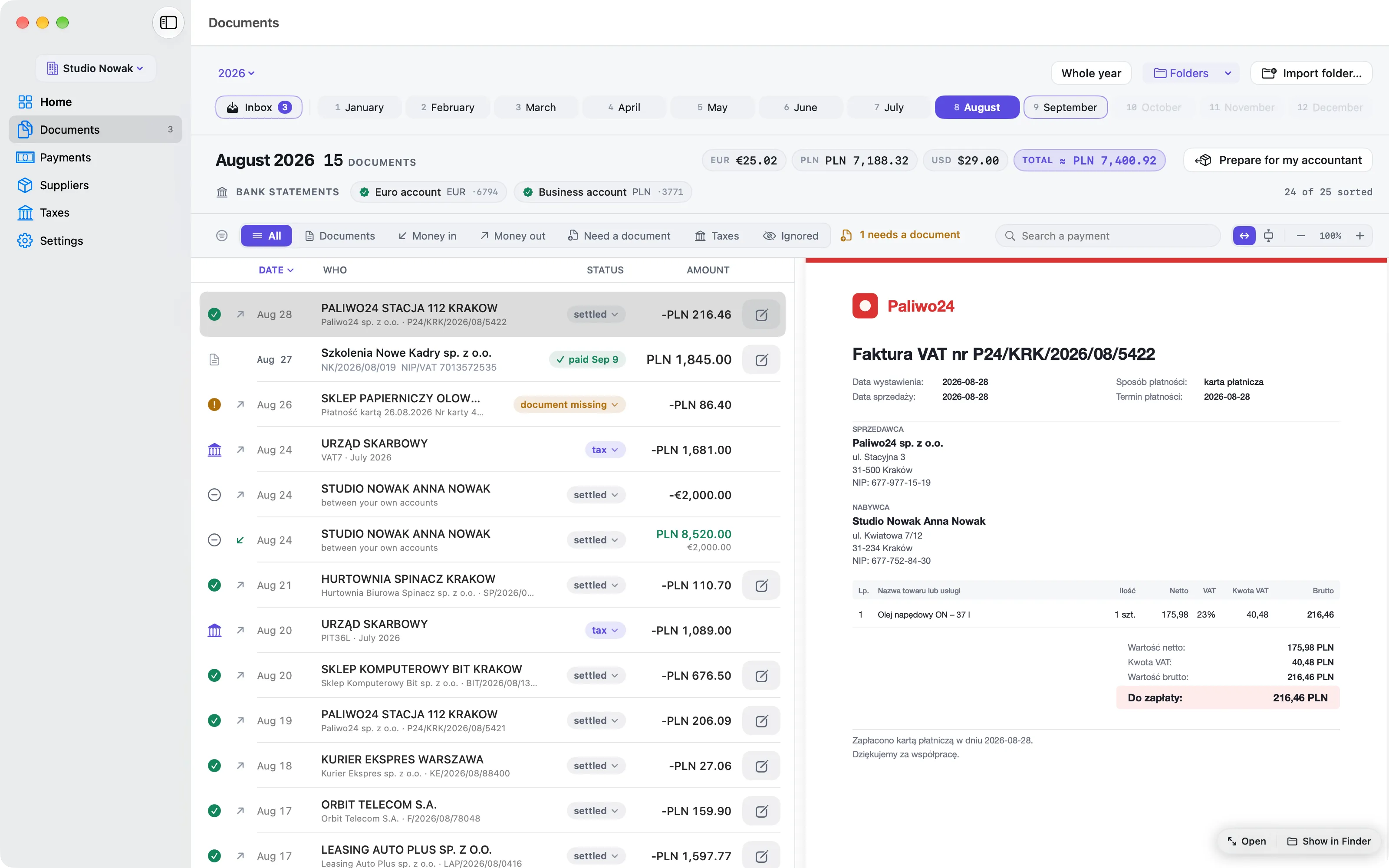
The whole month on one page.
Payments and documents sit in one list, newest first. A payment shows the document that explains it; a document nothing paid for stands on its own. Pick a line and the PDF opens beside the list.
Show only what needs a document, the taxes, or what you set aside
Search by seller, number or amount
Totals per currency, with the złoty value of foreign ones
The statement for each bank account sits at the top
3Bank statements
Every payment finds its document.
Add your bank account once in Settings, then each month’s statement as a PDF. Komplet reads every line, checks the statement’s own totals, and pairs each payment with the invoice that explains it.
PDF statements from any bank, in Polish or English
Link a payment by hand when you know better: Komplet never overrules you
Ignore a line, or never ask for a document from a seller again
Tax and ZUS transfers are recognised and need no document
19Card · Paliwo24no document yetNeeds a document−246,50 zł
amber = still missing
4For your accountant
One click, and the month is ready to hand over.
“Prepare for my accountant” makes a folder and a ZIP of the month: every document under its readable name, a Statements folder, and a summary as PDF and as a spreadsheet.
Summary.pdf to read or print
Summary.csv that opens in Excel with Polish letters intact
Send it with Mail, or share a link from iCloud Drive
Komplet remembers where you keep your packages
2026-08 Studio Nowak
Statements
2026-08-02 Chmura Hosting FV-2026-08-118.pdf
2026-08-05 Orbit Telecom 08-2026-4471.pdf
2026-08-09 Coworking Kraków Rynek 91-08-2026.pdf
2026-08-14 DesignKit Inc. INV-20931.pdf
2026-08-21 Paliwo24 FS-8812.pdf
Summary.pdf
Summary.csv
ZIP2026-08 Studio Nowak.zipready to send
your accountant gets this
Handing it over
Once a month, a short check.
Most of it happens as documents arrive. The end of the month is a short check, then one package.
1
As documents arrive
Drop each invoice or receipt on the menu-bar icon. Komplet files it in the right month.
2
When the statement is out
Add the month’s PDF on the month page, on its bank account’s grey + chip.
3
Look at what is amber
Add the missing document, link it by hand, or ignore the line.
4
Hand it over
Click “Prepare for my accountant”, then send the ZIP.
Three ways to send the package
By Mail
Send the ZIP straight from Komplet with Mail.
As a link
Keep your packages in iCloud Drive and send a link instead of a file.
In a shared folder
If your accountant already has access to a folder of yours, keep your packages there.
No. They receive ordinary files: PDFs under readable names, the bank statements, Summary.pdf and Summary.csv. Nothing to install, no account to open.
Does Komplet keep my books?
No. It does not book entries, work out your tax or file returns. It keeps the documents behind them in order, for you or for your accountant.
Which banks can it read?
PDF statements from any bank, in Polish or English.
What happens to my files if I stop using Komplet?
Nothing. They are in your own folders, under readable names, and they stay exactly where they are.
Is it really free?
Yes. Everything on this page is free: managing your paperwork costs nothing. Connect, 29 zł a month, VAT included, is only for when you want Komplet to connect to KSeF and inFakt, and automate more. See pricing.
Close every month without the hunt.
Drop documents in as they arrive. Komplet files them, checks them against your bank statement and tells you what is still missing. Free, for your Mac.