HomeFree

Home: where you stand, the moment you open the app.

One page for the month: what needs you, how complete it is for your accountant, where the money went and what is coming up. Pick any month from the menu at the top.

  • Needs your attention: only what is urgent, such as documents waiting in the Inbox, payments with no document, a client paying late
  • The month’s accounting: payments explained, documents missing and statements in, with a ring that fills as the month gets ready and the day it is due to your accountant
  • Where your money went, by category or by supplier, and what Komplet noticed: a supplier billing more than usual, a subscription due next week
  • Cash flow across the year: money in, costs, and taxes and ZUS, month by month
  • To do: notes with a date, and the document or file they are about
  • Upcoming payments: VAT, income tax and ZUS with an estimate, and what is available in each bank account
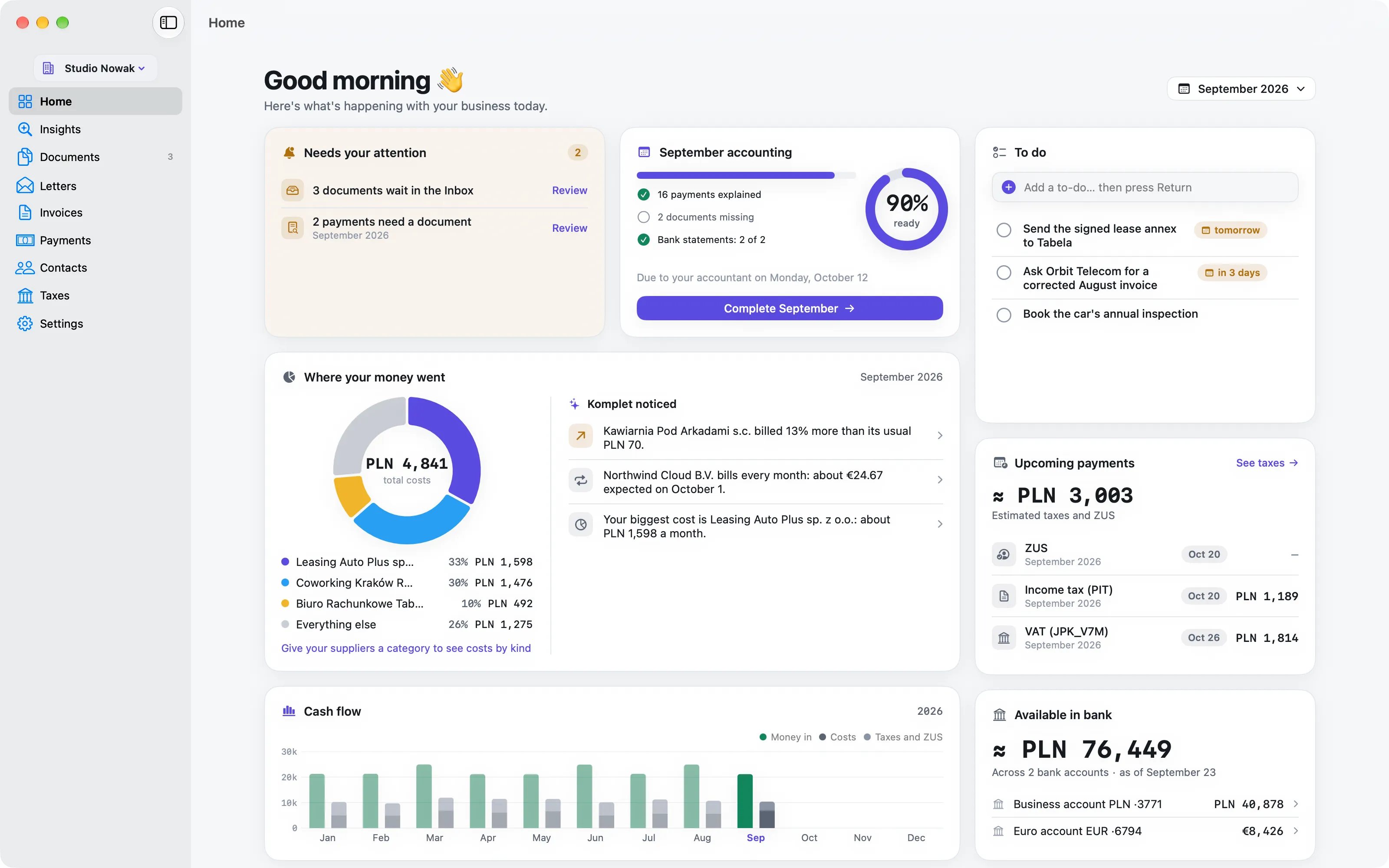
Komplet’s Home: what needs attention, the month’s accounting, where the money went, cash flow, to-dos, upcoming payments and bank balances.
InboxFreeConnect

Inbox: drop it in, Komplet reads it.

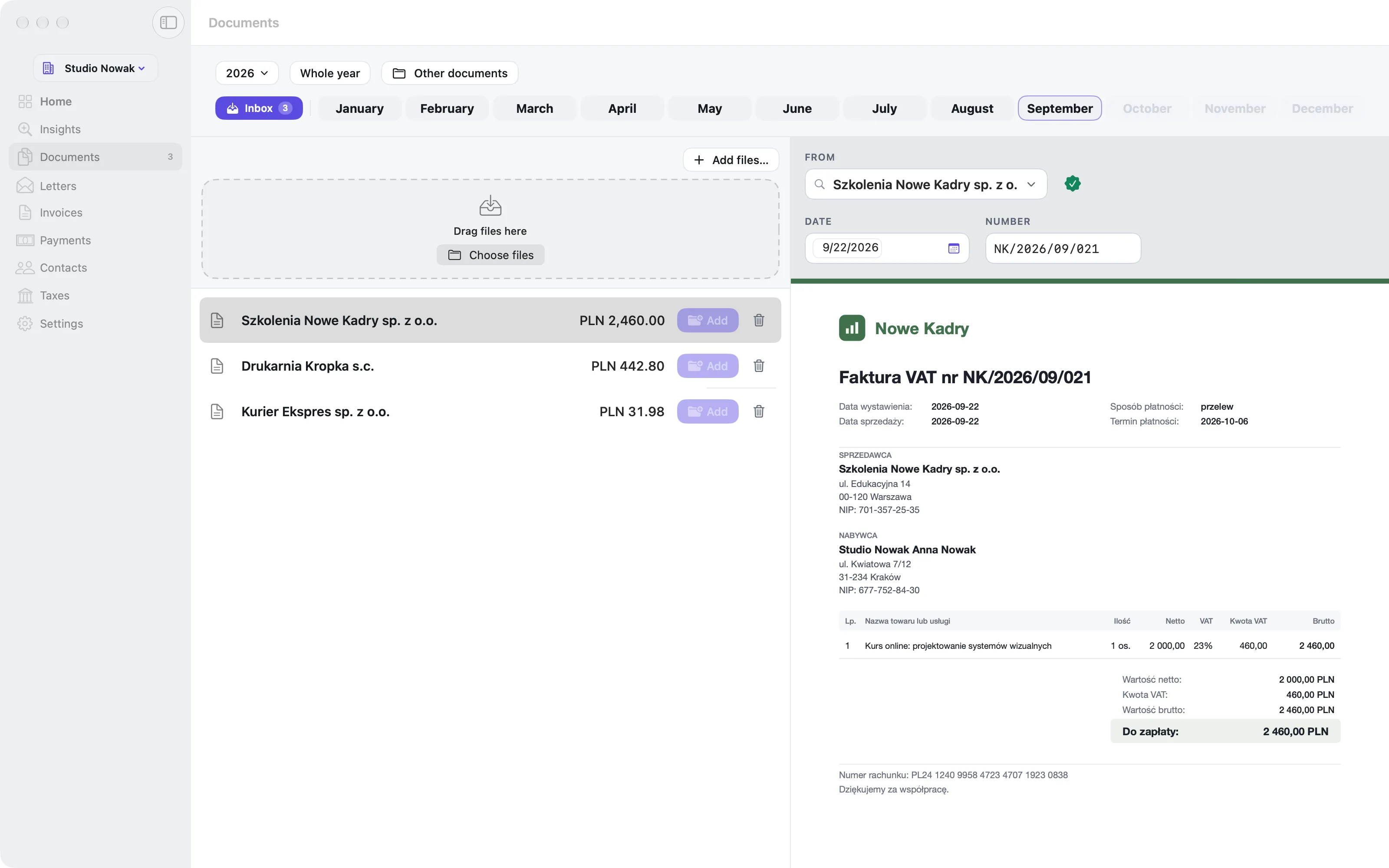
Every new document starts here. Drag a PDF, a scan or a photo onto the window or the menu-bar icon, or open it with ⌘O. Komplet fills in the fields; you check them and file.

  • Seller, NIP, invoice number, date, amount and currency read for you, in Polish and English
  • Scans and photos read with Apple’s text recognition, on your Mac: nothing is uploaded to be read
  • Known suppliers recognised from their first invoice on
  • The same file twice is noticed, and a document already filed says Already in September
  • Found in your Downloads: invoices you have just downloaded are offered, with a preview, to add or wave away (your Desktop too, if you allow it)
  • Paid or to pay, the month it belongs to, and a check for anything missing before you file
  • Filed into your own folder for that month, under a name you can read. Send it to inFakt as well

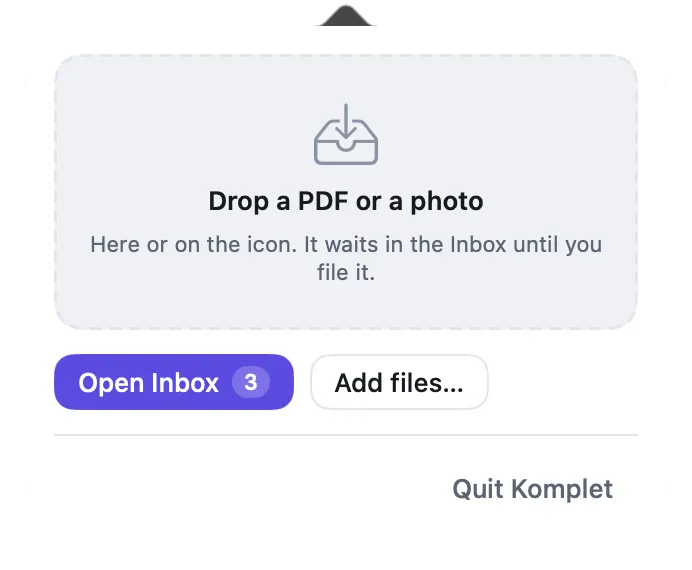
Good to know: The menu-bar icon shows how many documents are waiting, and a file dropped on it goes straight to the Inbox, without opening the window.

Komplet’s Inbox: an invoice with the seller, NIP, number, date and amount read from it, ready to file.
The Komplet panel under the menu-bar icon, with a large drop zone for files.
DocumentsFree

Documents: a month on one page.

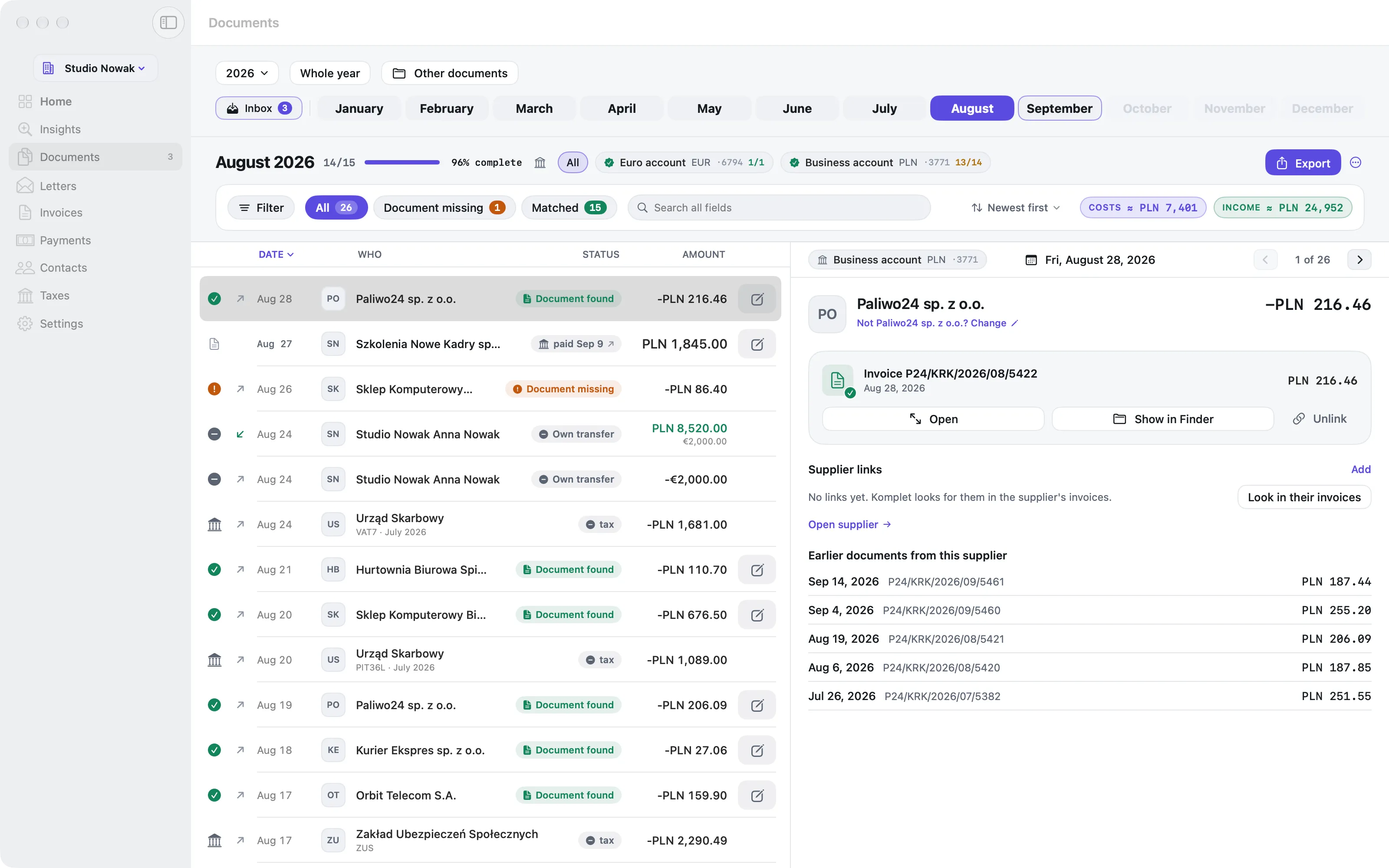
The month’s bank payments and its documents in a single list, newest first. A payment shows the invoice that explains it; a document nothing paid for stands on its own; a payment with no document shows in amber.

  • The statements on top, one chip per bank account, with a check that their totals add up; a grey “+” until that account’s statement is in
  • Filters (everything, needs a document, taxes, ignored) and a search that finds names, amounts and invoice numbers
  • Totals per currency, with the NBP rate into złoty under foreign amounts
  • The document itself on the right: fit the width or the whole page, zoom, or open it full size
  • When a match is unsure, “Which document is this?” offers the three best candidates. Link by hand when you know better: Komplet never overrules you
  • Ignore a line, or never ask for a document from a seller again; bank fees, your own transfers and tax payments need none
  • A document dated in another month is flagged Check month, and the same invoice filed twice is shown once

Good to know: Komplet reads the folders you already have: point it at years of month folders and it indexes them where they are.

A month in Komplet: every payment next to the document that explains it, the statements on top, the invoice on the right.
InvoicesFreeConnect

Invoices: issue one in a minute, send it to KSeF in one step.

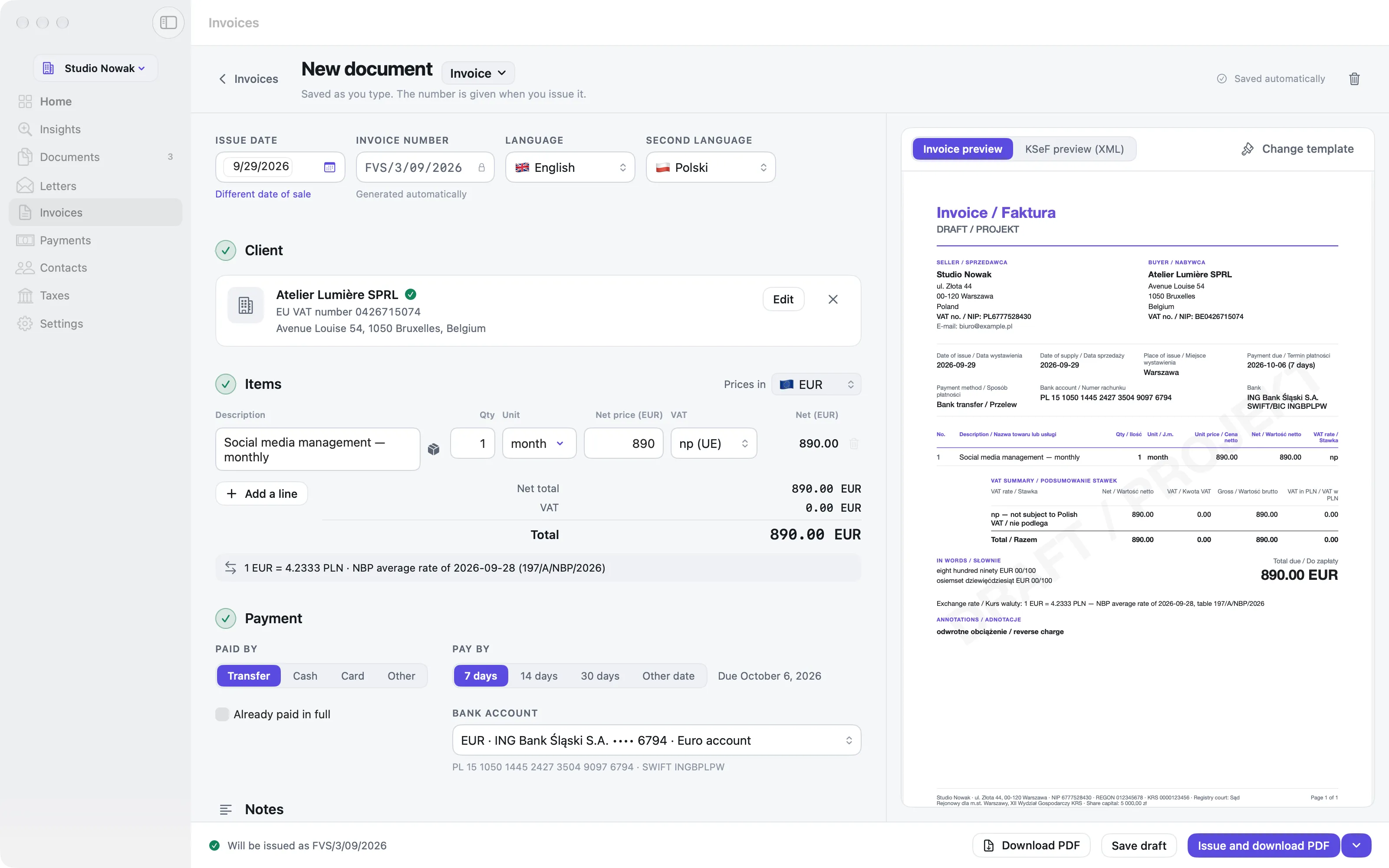
A new invoice is three numbered steps, client, items and payment, with the finished invoice beside it as you type. It saves itself, and checks what the VAT Act requires before you issue it.

  • Find a company by NIP in the Ministry of Finance’s VAT register, or pick one of your previous clients; EU businesses by their VAT number
  • VAT rates, reverse charge, split payment, exemptions with their legal basis; totals per rate and the amount in words
  • Invoices, proformas and corrections, each with its own numbering (FVS/1/09/2026, PRO/…, KOR/…)
  • The PDF in Polish, English, French or German, with your logo, colour and typeface; foreign currencies with the NBP rate
  • Saved products and services, for the lines you bill every month
  • Paid and unpaid at a glance, with overdue totals; a payment on your bank statement marks the invoice paid by itself
  • Issue and send to KSeF, with KSeF’s number and QR code on the invoice; your suppliers’ KSeF invoices filed into the right month
A new invoice in Komplet: client, items and payment in numbered steps, with the finished invoice beside them.
PaymentsFree

Payments: what is paid, and what is not.

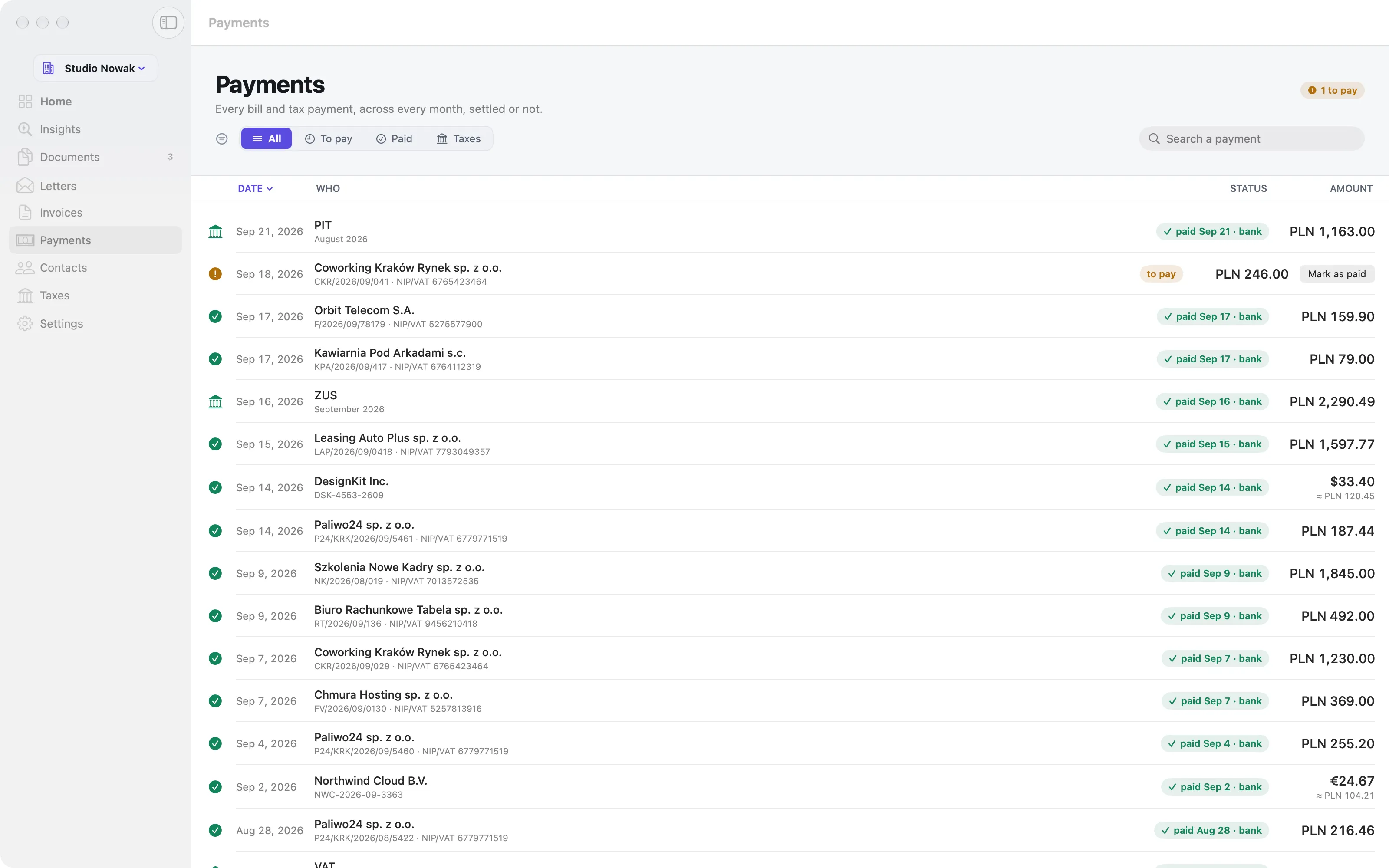
Every cost document and every tax payment of the year in one list, and the bank transfer or card payment that settled each one, whichever month it was in.

  • Paid and when, straight from your bank statements; a subscription invoiced in one month and paid the next is still matched
  • Filters: all, to pay, paid, taxes; and a search across sellers, numbers and amounts
  • Mark a document paid by hand, and it is written back to the document itself
  • The same payment shows on the document’s own month page, so both places agree
Komplet’s Payments: cost documents and tax payments across the year, with the payment that settled each.
ContactsFree

Contacts: your suppliers and clients, one name each.

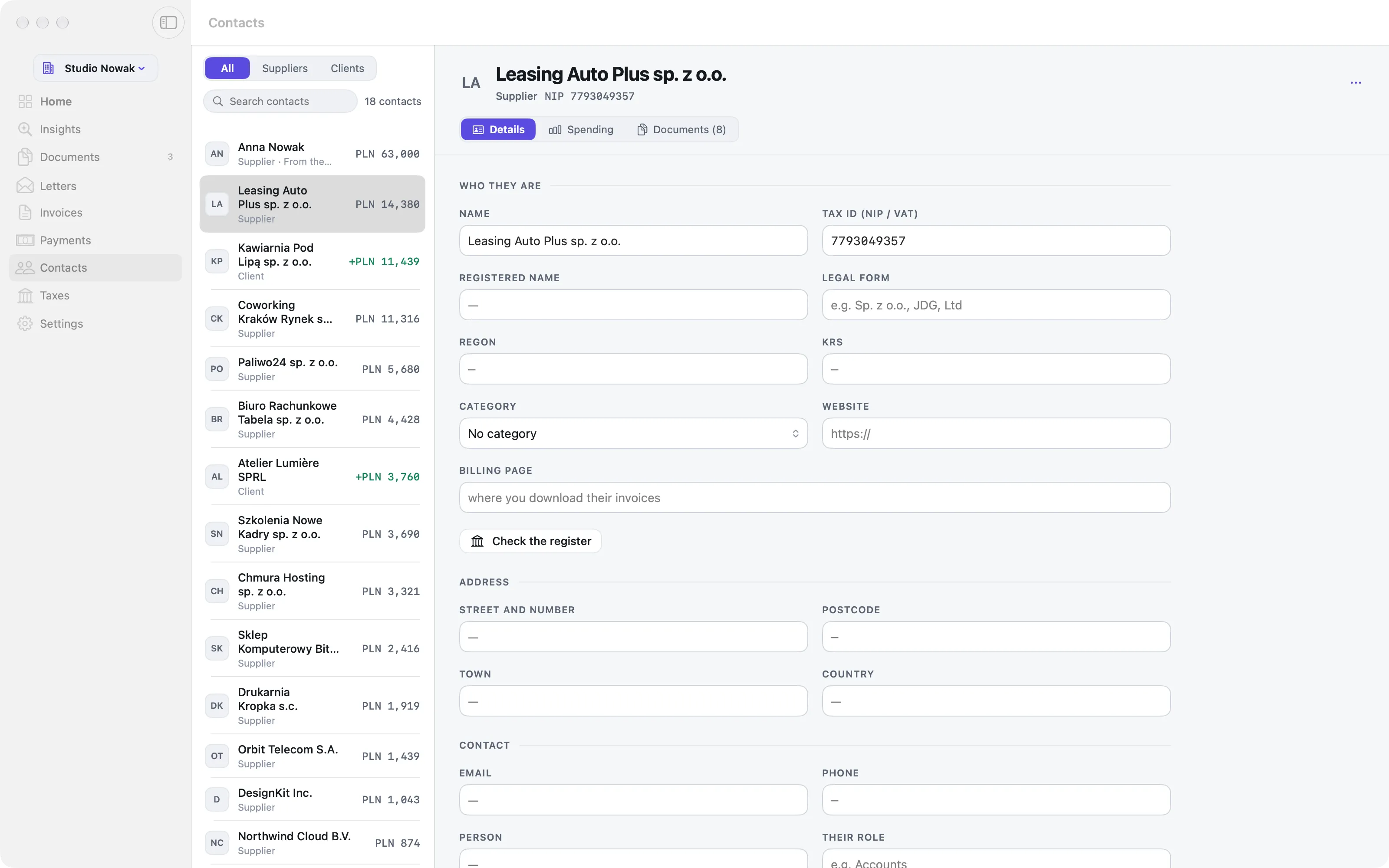
One card per company you buy from or sell to. Komplet builds them from your documents, your invoices and your bank statements, and keeps one name for each everywhere in the app.

  • What the bank printed becomes a readable name: “CURSOR USAGE MID DEC” is Cursor
  • Spending over the last twelve months or any year, in złoty even when they bill in euro or dollars
  • Twenty fixed categories, so your costs add up by kind as well as by supplier
  • Details: NIP, VAT status, billing page and logo, saved as you type
  • Clients made from the invoices you issue, ready for the next one, with their income and invoices
  • Names on bank statements can be moved to the right contact, and a name you remove is never put back
Komplet’s Contacts: suppliers ranked by twelve months of spending, with each one’s details, spending and documents.
TaxesFree

Taxes: VAT, income tax and ZUS, on time.

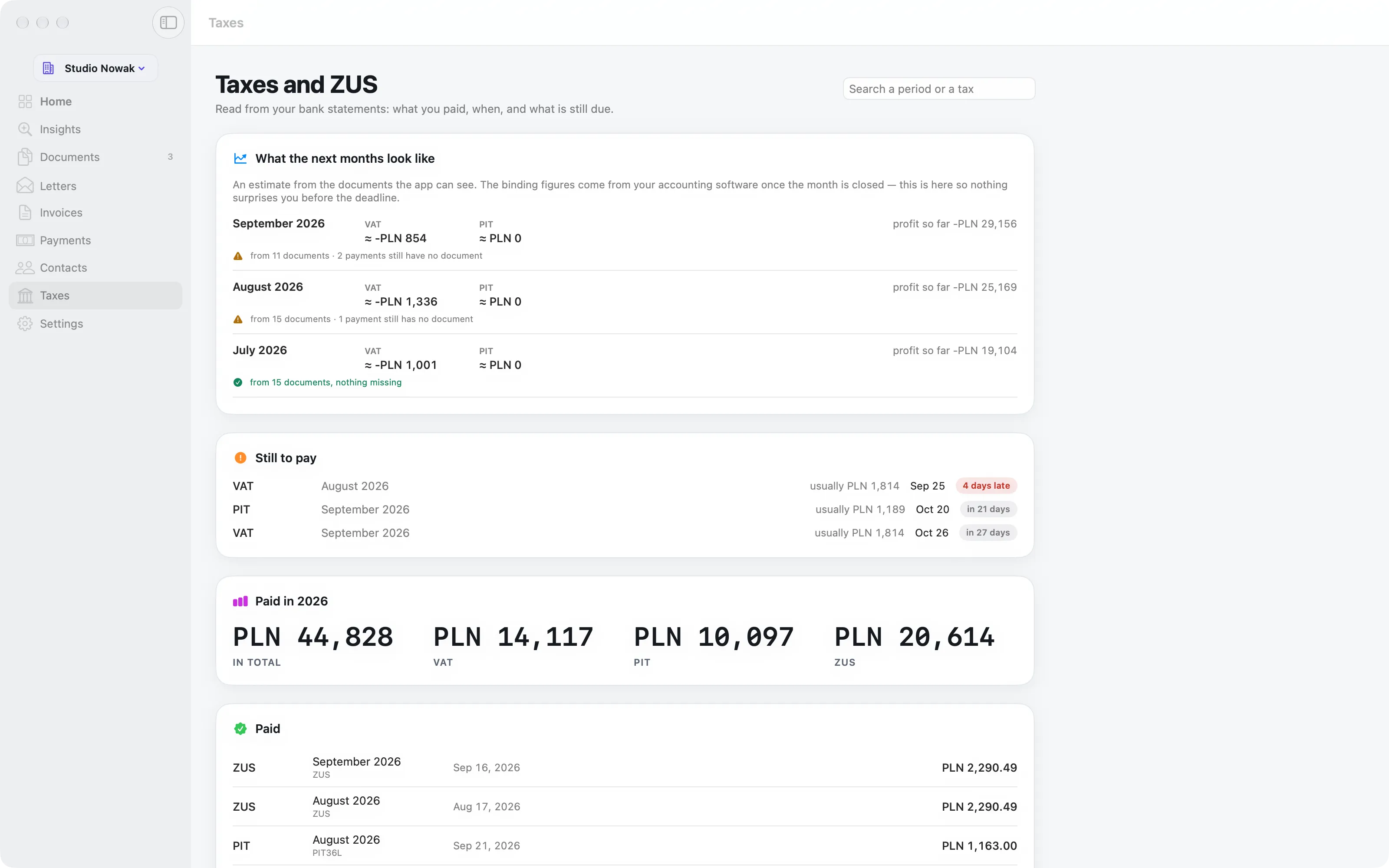
Komplet reads the transfers to your tax micro-account and to ZUS on your bank statements, and groups them by tax and period, so you can see what was paid, when, and what comes next.

  • The Polish tax transfer format read line by line: the form, the period and the note
  • Paid and when, with interest kept apart from the tax itself
  • Called late only when a statement proves it
  • Open periods with a hint of the usual amount, and year totals
  • Due dates from your own settings, moved off weekends and Polish public holidays
Komplet’s Taxes: ZUS and income tax payments grouped by period, with the dates they were paid and what is due next.
LettersFreeKomplet AI

Letters: a letter from the tax office, in plain words.

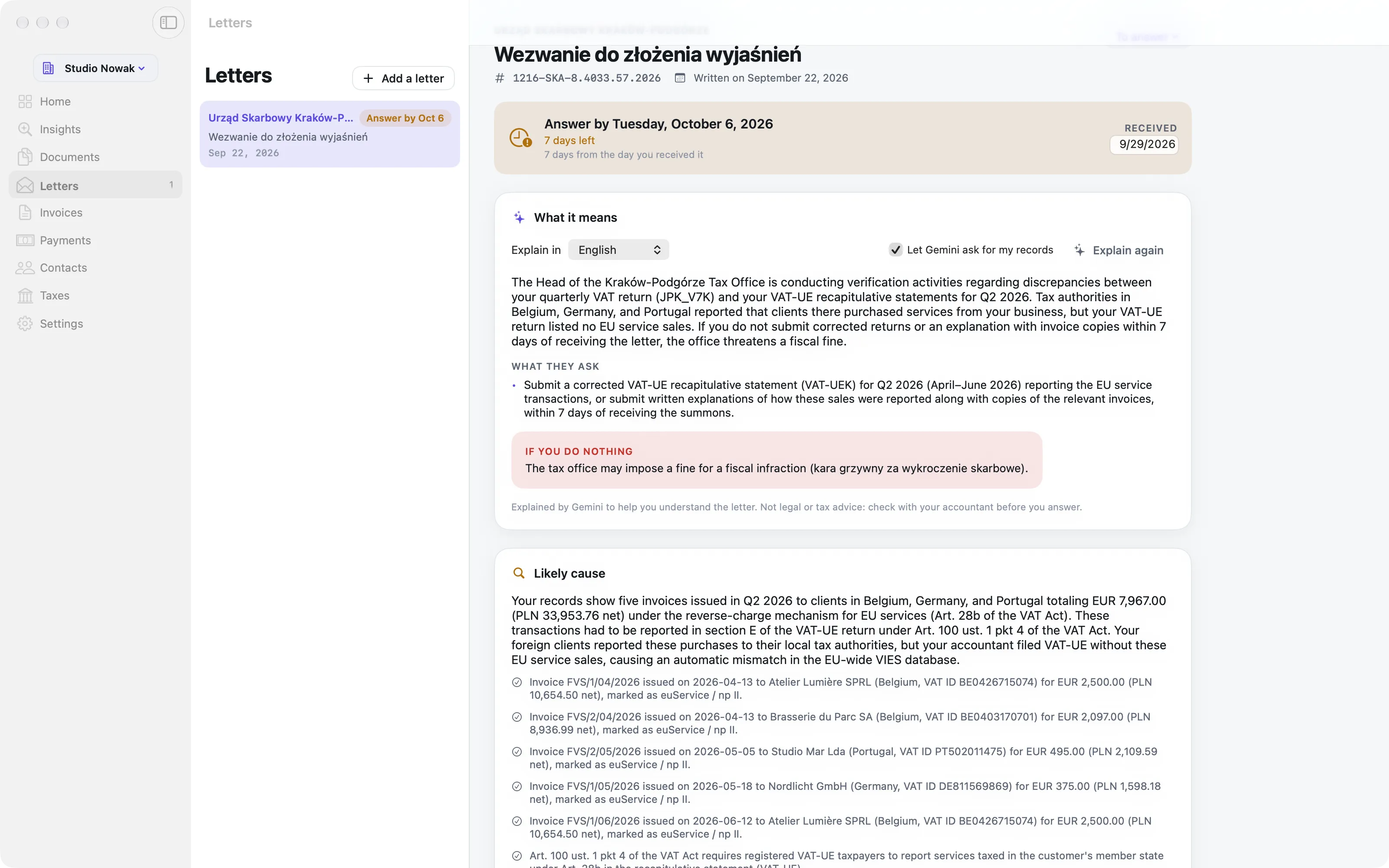
Add a letter from the tax office, ZUS, customs, a court, a bailiff or the town hall. Komplet reads the essentials on your Mac, and Komplet AI explains the rest: what they ask, by when, and what happens if you do nothing.

  • Read on your Mac, with no AI: the office, the case number, the date, who handles it and how to reach them, and the deadline counted from the day you received it, weekends and holidays skipped
  • Letters are also spotted among your downloads, and kept on a page of their own, apart from your invoices
  • Explain: what it means, what they ask and what happens if you do nothing, in English, Polish or Ukrainian, with a full translation
  • Before anything of yours is shared, you see which records Gemini asks for (for example the invoices from April to June) and tick what it may see
  • The likely cause, from your own records; a formal reply in Polish you can edit; a message for your accountant with the letter and the invoices attached
  • Every claim checked against the law and official sources, which are listed; “Check my edits” runs the check again after you change the reply
  • The steps go to your to-dos, with the letter attached and its due date

Good to know: An explanation helps you understand and prepare. It is not legal or tax advice: check with your accountant before you answer.

A letter from the tax office in Komplet: the deadline, what it means, what they ask, what happens if you do nothing, and the likely cause.
InsightsFreeKomplet AI

Insights: what your numbers say.

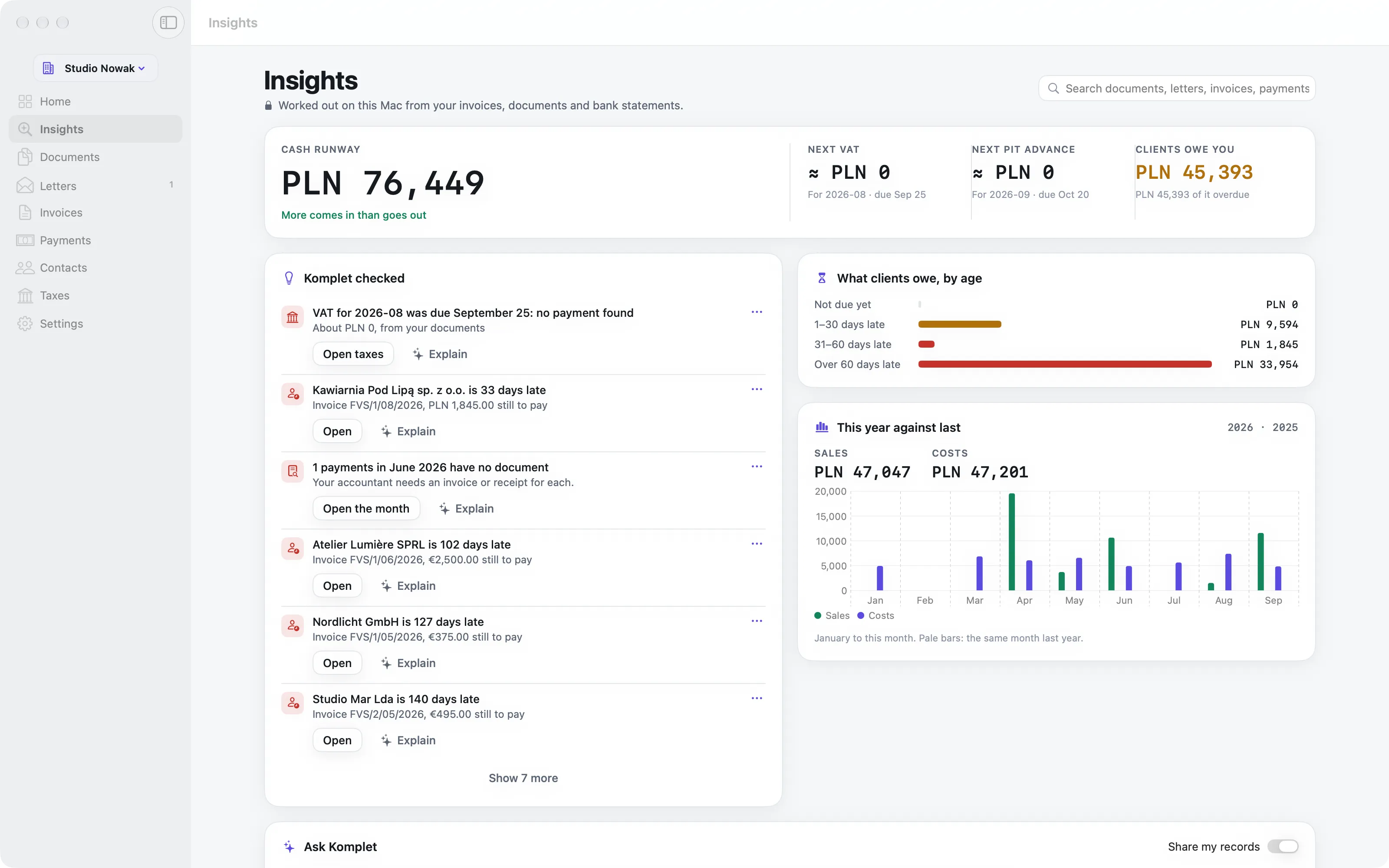
Worked out on your Mac from your invoices, documents and bank statements: how long your cash lasts, what the next taxes will be, who owes you what, and the things worth a second look.

  • Cash runway: your latest balances against the average net outflow of the last three months
  • Next VAT, income tax and ZUS, with the best estimate your documents allow
  • What clients owe, by how late it is, and this year against the last
  • Findings: an EU sale without the buyer’s VAT number, a client paying late, payments without documents, a tax due this week or paid late without interest. Hide the ones you have handled
  • Search every document, letter, invoice and bank line, on your Mac
  • One click on Explain puts a finding in plain words
Komplet’s Insights: cash runway, the next taxes, what clients owe by age, this year against last, and findings worth a look.
Ask KompletKomplet AI

Ask Komplet: questions about your business, answered from your records.

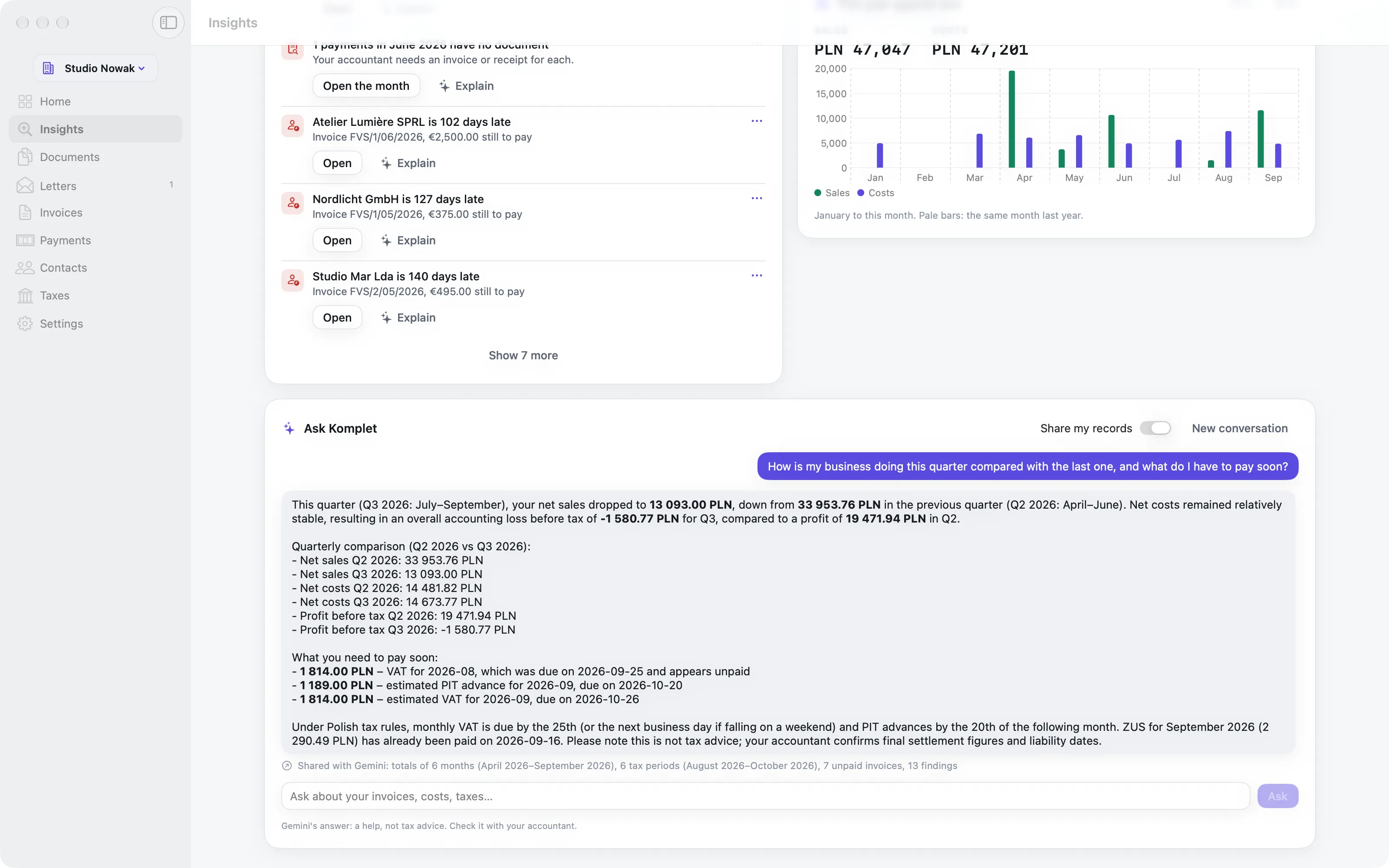
At the bottom of Insights. Ask in your own words, such as “How does this quarter compare with the last?” or “Which clients are late?”, and get an answer with the figures from your own records.

  • Gemini asks Komplet for what it needs (month summaries, invoices, costs, cash flow, tax periods, what clients owe) and your Mac answers each request from your records
  • Every record shared is listed under the answer, so you always know what was sent
  • Turn off Share my records and nothing about your records is sent
  • In English, Polish or Ukrainian
  • An answer is a help, not tax advice: your accountant has the last word
Ask Komplet: a question about the quarter answered with figures from the business’s own invoices and statements, with what was shared listed below.
SettingsFreeConnect

Settings: your company, set up once.

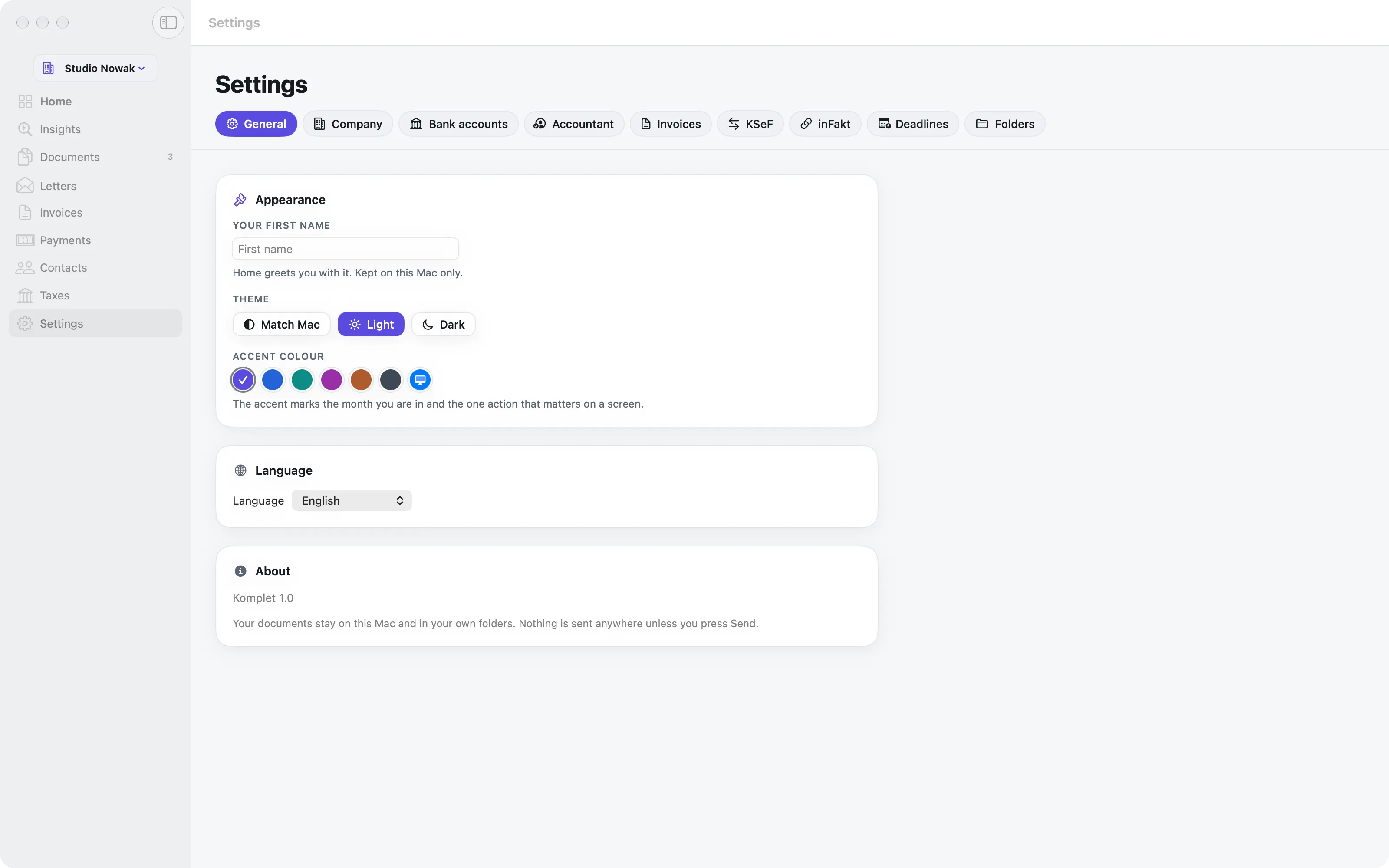
Everything Komplet needs to know about your business, in one place, used everywhere: on your invoices, for your deadlines, and to put each statement on the right account.

  • Company details entered once: name, NIP, address, registry details for the invoice footer
  • Bank accounts by IBAN, checked as you type; each statement goes onto its own account
  • Your deadlines: your tax form and your ZUS dates
  • Folders: where documents are filed, and which folders Komplet may look in
  • Where your month packages go, the language (English or Polish), light or dark, and your accent colour
  • Several companies, each with its own folders, accounts and contacts
Komplet’s Settings: the company, its bank accounts, deadlines and folders.
For your accountantFree

For your accountant: one click, and the month is ready.

“Prepare for my accountant” on any month builds a folder and a ZIP your accountant can open without Komplet.

  • Every document under a readable name: date, seller and number
  • A Statements folder with the month’s bank statements
  • Summary.pdf to read and Summary.csv that opens in Excel
  • Send it by Mail or Mail Drop, or share a link from iCloud Drive
  • Komplet remembers where you keep your packages
2026-08 Studio Nowak
  • Statements
  • 2026-08-02 Chmura Hosting FV-2026-08-118.pdf
  • 2026-08-05 Orbit Telecom 08-2026-4471.pdf
  • 2026-08-09 Coworking Kraków Rynek 91-08-2026.pdf
  • 2026-08-14 DesignKit Inc. INV-20931.pdf
  • 2026-08-21 Paliwo24 FS-8812.pdf
  • Summary.pdf
  • Summary.csv
2026-08 Studio Nowak.zipready to send
your accountant gets this

Want the routine rather than the screens?

How it works follows one month from the first invoice to the package for your accountant.

How it works →

See it on your own documents.

Komplet is free on the Mac App Store. Drop in this month’s invoices and add your bank statement.

Mac only